
Application Integration Approaches, Key Obstacles, and Proven Strategies
Table of Contents
Modern businesses don’t run on a single system. They rely on dozens—sometimes hundreds—of applications across sales, marketing, finance, HR, operations, and customer support.
From CRM platforms and ERP systems to marketing automation and analytics tools, data lives everywhere. The challenge? Making those systems talk to each other in real time, securely, and at scale.
That’s where application integration becomes mission-critical.
In this guide, we’ll explore:
- The most common application integration approaches
- Key obstacles organizations face
- Proven strategies to build scalable, future-proof integrations
What Is Application Integration?
Application integration is the process of connecting different software systems so they can share data, trigger workflows, and operate as a unified ecosystem.
For example:
- Syncing leads from HubSpot to Salesforce
- Sending order data from Shopify to an ERP
- Updating support tickets between Zendesk and internal systems
Without integration, teams operate in silos. With it, organizations unlock automation, visibility, and efficiency.
Core Application Integration Approaches
There’s no one-size-fits-all method. The right approach depends on architecture, scalability needs, compliance requirements, and team maturity.
Below are the most widely adopted integration models.
1. Point-to-Point Integration
Each application connects directly to another via APIs or custom connectors.
Best For
- Small businesses
- Limited number of apps
- Simple workflows
Advantages
- Quick to implement
- Low upfront cost
- Minimal infrastructure
Limitations
- Hard to scale
- Maintenance complexity increases rapidly
- Tight coupling between systems
As applications grow from 3 to 30, this approach becomes a tangled web of dependencies.
2. Middleware-Based Integration
A central middleware layer acts as an intermediary between systems.
Examples include:
- Enterprise Service Bus (ESB)
- API gateways
- Integration platforms
Best For
- Mid-sized to enterprise organizations
- Complex workflows
- Multiple application dependencies
Advantages
- Centralized management
- Improved monitoring
- Reduced duplication
Limitations
- Requires architectural planning
- Higher initial cost
- Potential single point of failure if poorly designed
3. API-Led Integration
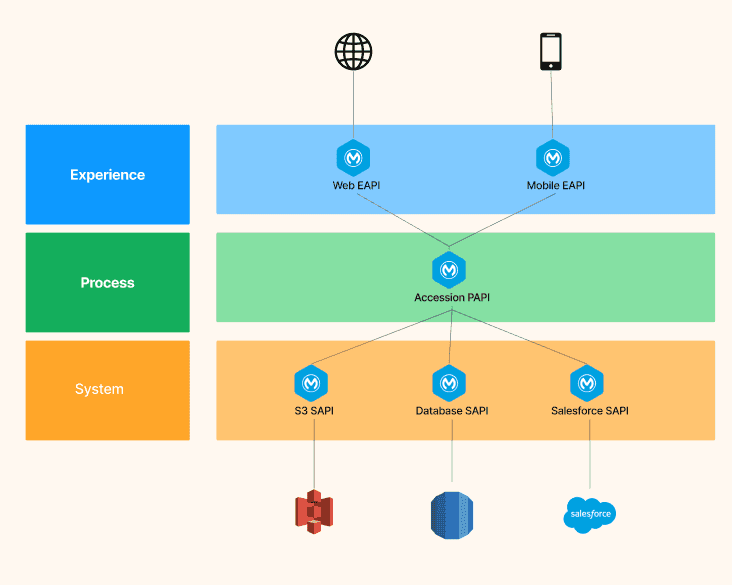
Systems expose APIs in layered architectures:
System APIs – Access core systems
Process APIs – Combine and transform data
Experience APIs – Deliver tailored outputs
Best For
- Digital-first businesses
- Microservices architecture
- Scalable SaaS ecosystems
Advantages
- Reusable components
- Decoupled architecture
- Faster innovation
Limitations
- Requires API governance
- Documentation and version control are critical
4. Event-Driven Integration
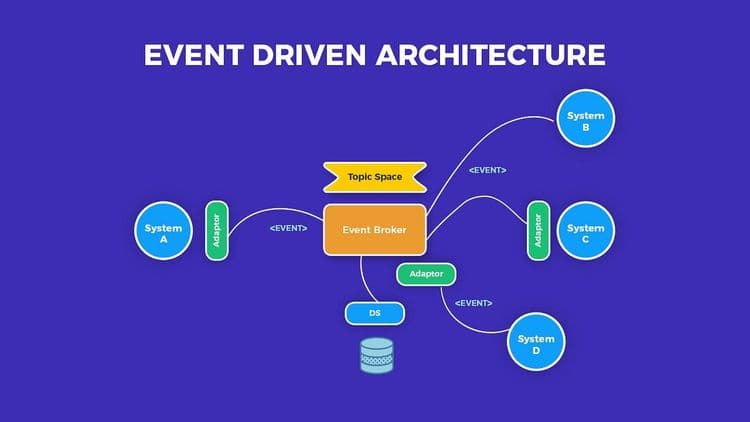
Applications communicate through events. When one system triggers an action, other systems respond.
Example:
Customer places order → Inventory updates → CRM logs activity → Email triggers confirmation.
Best For
- Real-time systems
- High-volume SaaS environments
- Asynchronous workflows
Advantages
- Real-time responsiveness
- Highly scalable
- Loose coupling
Limitations
- Debugging complexity
- Monitoring requirements increase
Common Obstacles in Application Integration
Even well-planned integration initiatives encounter friction. Here are the biggest challenges.
1. Data Silos
Departments often use separate tools with inconsistent data formats.
Impact:
Duplicate records
Reporting inaccuracies
Poor customer experiences
2. Legacy System Constraints
Older systems may:
Lack APIs
Use outdated protocols
Require custom adapters
Modern SaaS tools often need bridging mechanisms to integrate with legacy infrastructure.
3. Scalability Bottlenecks
What works for 10,000 users may fail at 1 million. Integration pipelines must handle:
Increased API calls
Concurrent data sync
High transaction volume
4. Security & Compliance Risks
Sensitive data flowing between systems increases exposure risk.
Concerns include:
Data encryption
Authentication protocols
GDPR/CCPA compliance
Access control policies
5. Maintenance Overhead
Every integration needs:
Monitoring
Version updates
Error handling
Logging
Without governance, integration debt accumulates.
6. API Rate Limits & Throttling
Many SaaS vendors enforce API usage caps. Poor architecture may trigger:
Delays
Failed syncs
Data inconsistencies
Use Cases of Application Integration
1. SaaS Customer Lifecycle Automation
- CRM syncs with marketing automation
- Billing platform updates subscription data
- Support tool logs customer activity
2. E-commerce Order Processing
- Payment gateway triggers ERP update
- Inventory adjusts automatically
- Shipping provider receives real-time request
3. Finance & Accounting Sync
- Expense management integrates with accounting software
- Payroll data connects with HR systems
- Real-time revenue reporting
Measuring Integration Success
Integration ROI should be measurable.
Track:
- Reduction in manual data entry
- Decrease in sync errors
- Time saved per workflow
- Increase in cross-system visibility
- Faster reporting cycles
If integrations don’t improve measurable efficiency, revisit architecture.
Future Trends in Application Integration
Integration continues evolving with:
- AI-powered automation
- Low-code integration platforms
- Embedded iPaaS solutions
- Real-time data streaming
- Composable architecture
Modern SaaS companies are moving toward:
- Decoupled systems
- Event-driven design
- Self-service integration marketplaces
Conclusion
Application integration is no longer optional—it’s foundational to digital transformation.
Whether you’re a growing SaaS startup or a large enterprise modernizing legacy infrastructure, the difference between chaotic operations and scalable growth often comes down to integration strategy.
https://www.klamp.ai/middleware" rel="noopener noreferrer">

For more info on easy automation solutions visit Klamp Embed & Klamp Connectors