
What Are the Key Features of an Integrated Solution?
Table of Contents
Businesses rely on multiple applications to run operations—CRM, ERP, marketing automation, support platforms, analytics tools, payment gateways, and more. But simply having multiple tools isn’t enough. The real value comes from how well they work together.
That’s where an integrated solution makes the difference.
An integrated solution connects systems, automates workflows, ensures data consistency, and provides a unified operational experience. Whether you're building integrations for enterprise clients or embedding integrations into your SaaS product, understanding the core features of a strong integrated solution is critical.
Below, we break down the essential features that define a truly robust integration architecture.
1. Seamless Data Synchronization
At the heart of any integrated solution is data synchronization.
What It Means
Data flows consistently between connected applications in real-time or near real-time.
For example:
- When a customer updates their information in a CRM, the ERP reflects it instantly.
- When an order is placed, billing, inventory, and analytics systems update automatically.
Why It Matters
- Eliminates duplicate records
- Reduces manual entry
- Prevents reporting discrepancies
- Improves customer experience
A high-quality integrated solution supports:
- Bi-directional sync
- Conflict resolution logic
- Change detection
- Data validation
Without reliable sync, integration loses its value.
2. Centralized Data Visibility
An integrated solution should provide a single source of truth.
Core Capability
Users gain centralized visibility into information that previously lived in silos.
Example:
- Sales sees billing status.
- Support sees customer lifetime value.
- Finance sees real-time sales pipeline.
This enables:
- Better decision-making
- Faster reporting
- Cross-team collaboration
Without centralized visibility, integrations only move data they don’t create insight.
3. Workflow Automation
Integration isn’t just about data exchange—it’s about action.
Key Feature
Trigger-based automation across systems.
Examples:
New customer created → Invoice generated automatically
Support ticket resolved → Survey triggered
Payment received → Subscription status updated
Strong integrated solutions offer:
- Event-driven triggers
- Conditional logic
- Multi-step workflows
- Error handling mechanisms
This eliminates repetitive manual processes and boosts operational efficiency.
4. API-Driven Architecture
Modern integrated solutions rely on APIs to ensure scalability and flexibility.
Essential Components
- REST or OData APIs
- Webhooks for real-time updates
- Secure authentication (OAuth 2.0)
- Version control
API-driven design ensures:
- Loose coupling between systems
- Easier upgrades
- Faster integration expansion
Without APIs, integrations become brittle and difficult to maintain.
5. Data Transformation & Mapping
Different systems use different data formats and structures.
An integrated solution must include:
- Field mapping configuration
- Data transformation rules
- Format normalization (dates, currency, units)
- Validation layers
Example:
- “Customer ID” in one system may be “Account Number” in another.
- Currency precision may vary between platforms.
A flexible transformation engine prevents sync failures.
6. Scalability & Performance Optimization
As your SaaS app grows, your integration architecture must scale.
Key features include:
- Asynchronous processing
- Message queues
- Rate limit handling
- Load balancing
- Batch processing
Enterprise-grade integrated solutions handle:
- High API call volumes
- Simultaneous transactions
- Traffic spikes
Scalability ensures integrations don’t break as usage increases.
7. Security & Compliance Controls
Security is non-negotiable in integrated systems
Essential security features:
- Encrypted data transmission (HTTPS/TLS)
- Token-based authentication
- Role-based access control (RBAC)
- Audit logs
- Data masking where required
For enterprise SaaS, compliance may include:
- GDPR
- HIPAA
- SOC 2
- SOX
An integrated solution must protect data at every step.
8. Error Handling & Monitoring
Integration failures are inevitable. What matters is how your system handles them.
Key capabilities:
- Real-time alerts
- Detailed error logs
- Retry logic
- Idempotency handling
- Dead-letter queues
Without monitoring, failures can go unnoticed—leading to data inconsistencies.
Observability is what separates basic connectors from enterprise-ready integration platforms.
Architecture Overview of a Modern Integrated Solution
Here’s a simplified structural view:
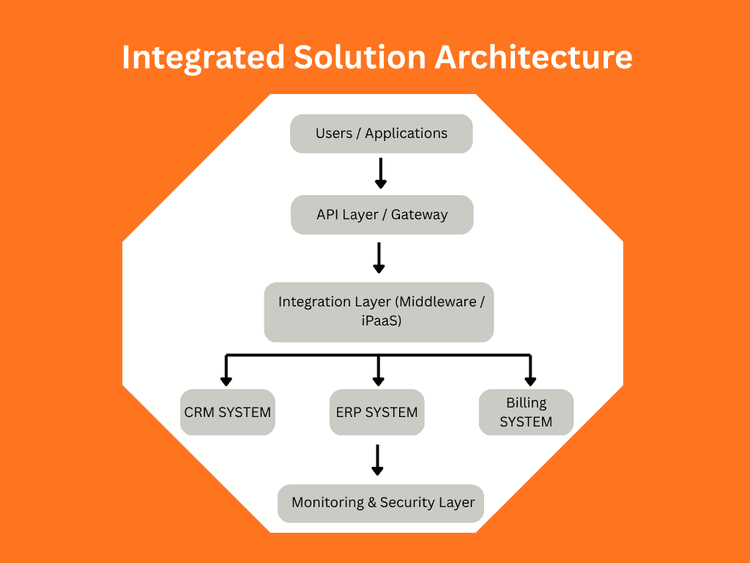
This layered approach ensures flexibility, maintainability, and scalability.
Business Benefits of a Strong Integrated Solution
When built correctly, integrated solutions deliver:
- Faster operations
- Reduced manual work
- Improved customer experiencE
- Real-time decision-making
- Increased revenue visibility
- Better cross-team collaboration
For SaaS companies, integration capability often becomes:
- A competitive differentiator
- A revenue driver
- A retention mechanism
- An enterprise sales enabler
Conclusion
An integrated solution is much more than connecting two APIs.
It is a strategic architecture that ensures:
- Systems communicate reliably
- Data remains consistent
- Workflows run automatically
- Security stays intact
- Operations scale effortlessly
Whether you're designing integration for enterprise ERP connectivity or building embedded integrations inside your SaaS product, these key features determine long-term success.
For more info on easy automation solutions visit Klamp Embed & Klamp Connectors