
SaaS Billing Software: How to Choose the Right Platform in 2026
Table of Contents
SaaS billing software has gone from a back-office tool to a growth engine. In 2026, pricing is increasingly treated as a strategic product capability rather than a static finance decision, and automating billing remains a top priority for most SaaS companies.
The reason is complexity. A few years ago, most SaaS companies charged a flat monthly fee per user. Today, many combine subscriptions with usage-based charges, AI credits, add-ons and annual commitments. About 46% of SaaS companies already mix subscriptions with variable charges. Spreadsheets and basic payment tools cannot keep up.
This guide explains what SaaS billing software does, which features matter most for US companies, how to know when you have outgrown your current setup and how to choose and migrate to the right subscription billing software.
What is SaaS billing software?
SaaS billing software automates how a software company charges its customers. It sits between your product, your payment processor and your accounting system, and it handles the full billing lifecycle:
• Plans and pricing. Define subscription tiers, usage rates, add-ons, discounts and free trials.
• Subscription management. Handle sign-ups, upgrades, downgrades, pauses and cancellations, with automatic proration.
• Usage metering. Collect and rate usage events, such as API calls or AI credits, for usage-based billing.
• Invoicing. Generate accurate invoices on schedule, in the right currency and with the right tax.
• Payments. Collect cards, ACH and wire payments, and retry failed charges automatically.
• Revenue reporting. Track MRR, ARR, churn and expansion, and support revenue recognition for accounting.
A recurring billing platform replaces manual invoicing, spreadsheet tracking and late-night reconciliation. The result is fewer errors, faster cash collection and better data for decision-making.
Why billing automation matters for growth
Billing touches every customer every month. Mistakes create support tickets, damage trust and slow down renewals. Good billing automation lets your team launch new pricing in days instead of months, which matters when competitors are experimenting with new pricing models. It also reduces involuntary churn, where customers leave only because a card payment failed.
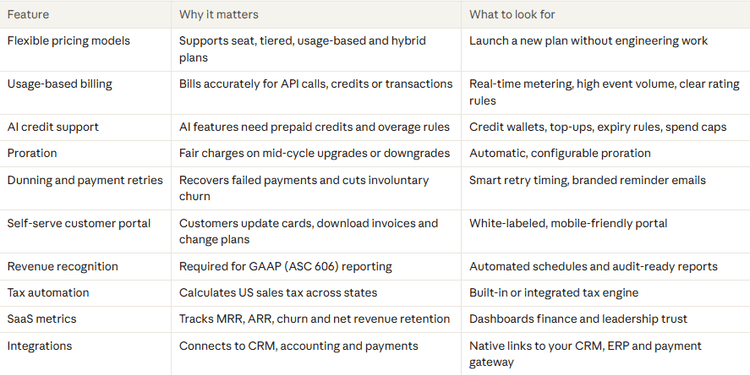
Must-have features in SaaS billing software
US sales tax and compliance
US sales tax is one of the hardest parts of billing for SaaS companies. Rules vary by state, and some states tax SaaS while others do not. Since the 2018 Supreme Court decision in South Dakota v. Wayfair, states can require tax collection from out-of-state sellers once they pass certain sales thresholds.
Your subscription billing software should either include a tax engine or connect to a dedicated one. It should:
• Determine whether each sale is taxable based on the customer’s location
• Apply the correct state and local rates automatically
• Track sales by state so you know when you cross nexus thresholds
• Produce reports your accountant can use for filing
Other compliance needs for US companies include PCI DSS for card data, SOC 2 for security and ASC 606 for revenue recognition. A mature recurring billing platform handles most of these out of the box.
Signs you have outgrown your current billing setup
Many US startups begin with a payment processor and a spreadsheet. That works until it does not. Watch for these warning signs:
• Finance spends days closing each month because billing data lives in several places.
• Launching a new plan needs engineering time, so pricing experiments stall.
• Invoices contain errors that customers report before you catch them.
• Failed payments are not retried in a structured way, and churn creeps up.
• You want usage-based billing but cannot meter or rate usage reliably.
• Sales offers custom deals that your system cannot represent.
• You are preparing for fundraising or an audit, and investors want clean revenue reports.
If three or more apply, it is time to evaluate dedicated SaaS billing software.
How to choose SaaS billing software
Follow these steps to find the right fit:
1. Map your pricing today and in two years. List every plan, add-on and discount you offer now, and the models you may add later, such as usage-based billing or AI credits.
2. Define your volume. Estimate customers, invoices and usage events per month. Some platforms struggle with millions of metered events.
3. Check your stack. Confirm native integrations with your payment gateway, CRM, accounting system and data warehouse.
4. Involve finance early. Revenue recognition, tax and reporting needs often decide the choice.
5. Test the customer experience. Sign up, upgrade, cancel and pay an invoice as if you were a customer.
6. Compare total cost. SaaS billing software is often priced as a percentage of revenue billed, a flat fee or both. Model the cost at your expected revenue in three years.
7. Ask about support and uptime. Billing outages directly affect cash flow, so check SLAs and support hours in US time zones.
Build vs buy
Some engineering teams consider building billing in-house. It rarely pays off. Billing looks simple until you add proration, tax, dunning, revenue recognition and usage metering. Most US SaaS companies get better results by buying a proven subscription billing software platform and spending engineering time on their core product.
How to migrate to a new billing platform
• Clean your data first. Remove duplicate customers and fix incorrect plan records.
• Run in parallel. Bill one cycle in both systems and compare every invoice.
• Migrate payment methods securely. Work with both vendors to move stored cards without asking customers to re-enter them.
• Communicate with customers. Tell them about new invoice formats or portal links before the first bill arrives.
• Cut over at a quiet time. Avoid quarter-end and major renewal dates.
Frequently asked questions
What is SaaS billing software?
It is software that automates subscription and usage-based charging, invoicing, payment collection and revenue reporting for SaaS companies.
What is the difference between a payment processor and billing software?
A payment processor moves money. SaaS billing software decides how much to charge, when and why, then sends the charge to the processor.
Does SaaS billing software handle US sales tax?
Many platforms include tax engines or integrate with one, calculating tax by state and tracking nexus thresholds.
Can billing software support usage-based pricing?
Yes. Modern platforms meter usage events in real time and combine them with subscription fees in a single invoice.
When should a startup buy billing software?
When manual billing slows down pricing changes, creates errors or takes finance more than a day each month.
For more info on easy automation solutions visit Klamp Embed & Klamp Connectors