
Pipedrive Pricing

Table of Contents
When it comes to managing sales pipelines and customer relationships, Pipedrive stands out as one of the most popular CRM tools. It’s designed with a sales-first approach, making it particularly appealing to businesses that prioritize sales management and lead tracking. However, understanding Pipedrive's pricing plans and choosing the right one for your business can be challenging. In this guide, we'll break down Pipedrive's pricing structure, highlight key features of each plan, and explain how you can maximize value for your investment.
What is Pipedrive?
Pipedrive is a CRM software designed to help businesses manage their sales processes. It offers an intuitive interface, customizable pipelines, and robust reporting tools. The platform is particularly favored by small and medium-sized businesses (SMBs) due to its ease of use and scalability.
Pipedrive Pricing Plans Overview
As of 2024, Pipedrive offers five main pricing tiers:
- Essential Plan - $15 per user/month (billed annually)
- Advanced Plan - $29 per user/month (billed annually)
- Professional Plan - $59 per user/month (billed annually)
- Power Plan - $75 per user/month (billed annually)
- Enterprise Plan - $120 per user/month (billed annually)
1. Essential Plan
The Essential Plan is Pipedrive’s entry-level offering, designed for small teams or businesses just getting started with a CRM. It provides all the core features necessary to manage a sales pipeline, including:
- Customizable pipelines and deal stages
- Email integration with tracking
- Calendar sync with Google and Outlook
- Basic reporting and insights
- Custom fields for better data management
The Essential Plan is ideal for businesses that want a simple, effective tool to manage sales without getting bogged down by unnecessary features.
2. Advanced Plan
The Advanced Plan steps up from the Essential Plan by offering enhanced automation and communication tools.
Key features include:
- Workflow automation (e.g., automating follow-up emails)
- Advanced email syncing with full email templates and group emailing
- Integration with apps like Trello, Slack, and Zoom
- Two-way email sync and tracking
- Email open and click tracking with notifications
For growing teams that need more automation and communication capabilities, the Advanced Plan offers a solid balance between functionality and affordability.
3. Professional Plan
The Professional Plan is designed for businesses looking for advanced sales features and deeper insights into their processes. This plan includes everything from the Advanced Plan, plus:
- Revenue forecasting tools
- Advanced reporting dashboards
- Team management tools (e.g., sales goals, team performance tracking)
- Caller integration with call tracking and recording
- Customizable roles and permissions
This plan is particularly useful for larger teams or businesses that need a CRM to support more complex sales processes and team management.
4. Power Plan
The Power Plan introduces more advanced automation and AI-driven insights.
Key features include:
- Full project management tools integrated with sales pipelines
- AI-powered sales assistance
- Enhanced team collaboration features
- Deeper integration capabilities with third-party apps
- Advanced workflow automation with branching logic
For companies focused on scaling and optimizing every aspect of their sales process, the Power Plan offers significant value.
5. Enterprise Plan
The Enterprise Plan is Pipedrive’s top-tier offering, tailored for large organizations that require robust customization, scalability, and premium support.
Features include:
- Unlimited customization of the CRM interface
- Enterprise-grade security measures
- Priority support with a dedicated account manager
- Advanced API access for custom integrations
- Custom onboarding and training services
For enterprises with complex needs and large sales teams, this plan offers the most comprehensive feature set.
How to Choose the Right Pipedrive Plan
Choosing the right plan depends on your business size, goals, and budget. Here are some quick tips:
- Small businesses or startups: The Essential Plan should suffice if you’re just getting started. It offers all the basics at an affordable price.
- Growing teams: The Advanced or Professional Plans are ideal for businesses that require more automation, reporting, and integration capabilities.
- Larger enterprises: The Power or Enterprise Plans will be more suitable if you need advanced AI features, extensive customization, and premium support.
How Klamp.io Can Enhance Your Pipedrive Experience
While Pipedrive is powerful on its own, integrating it with other tools and platforms can significantly enhance its capabilities. This is where Klamp.io, a no-code automation platform, comes in.
What is Klamp.io?
Klamp.io is an embedded integration platform that allows businesses to connect various apps and automate workflows without needing any coding knowledge. Whether you want to sync data between Pipedrive and Google Sheets, automate email campaigns, or manage tasks in Trello, Klamp.io provides a simple interface to set up these automations.
Key Benefits of Integrating Pipedrive with Klamp.io
- Seamless Data Syncing: Automatically sync leads, contacts, and deals across different platforms, ensuring your data is always up to date.
- Automated Workflows: Create complex workflows that trigger actions based on specific events in Pipedrive, such as sending follow-up emails or updating deal stages.
- Scalability: As your business grows, Klamp.io flexible architecture allows you to scale your integrations without worrying about technical complexities.
- No-Code Interface: Klamp.io drag-and-drop builder makes it easy to set up automations, even if you’re not tech-savvy.
Klamp.io Pricing: An Affordable Automation Solution
One of the standout features of Klamp.io is its affordable pricing. Unlike other automation platforms that charge steep rates as you scale, Klamp.io offers competitive pricing designed to suit businesses of all sizes.
- Starter Plan: Ideal for small businesses and individuals looking to automate simple workflows.
- Pro Plan: Designed for growing teams with more complex automation needs.
- Enterprise Plan: Tailored for large businesses that require extensive customization and support.
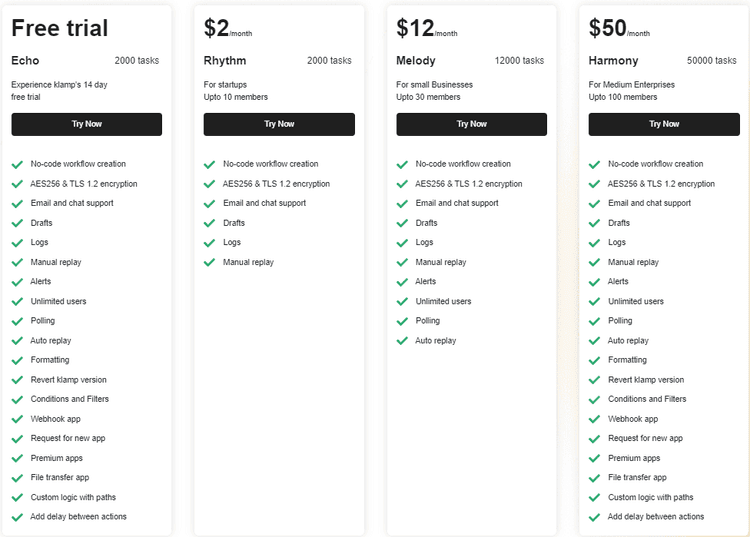
With Klamp.io cost-effective pricing and robust feature set, it’s the perfect companion for businesses looking to enhance their Pipedrive experience without breaking the bank. Explore how Klamp.io can simplify your workflow automation and take your sales processes to the next level.
For more info on easy automation solutions visit Klamp Embed & Klamp Connectors