
Using JSON Forms in Modern SaaS Application for UI
Table of Contents
JSON Forms This innovative approach to handling forms and data in SaaS applications is transforming how developers and users interact with data. In this blog, we'll explore what JSON Forms are, their benefits, and how they can be seamlessly integrated into your SaaS application.
What Are JSON Forms?
JSON Forms are a method of defining and handling forms using JSON (JavaScript Object Notation), a lightweight data-interchange format that's easy for both humans and machines to read and write. Essentially, JSON Forms use JSON schema to describe the structure, appearance, and validation of forms. This approach decouples the form's logic from its presentation, offering a more flexible and maintainable way to manage user inputs and data.
Why Use JSON Forms?
JSON Forms offer remarkable flexibility. By defining forms through JSON, you can easily change form structures, validation rules, and layouts without changing the underlying codebase. This separation of concerns allows developers to reuse form definitions across various parts of an application or even across different applications, reducing redundancy and enhancing maintainability.
With JSON Forms, forms can be generated dynamically based on the schema provided. This is particularly useful for applications that often require changing forms or need to handle various data types. For example, in a SaaS application that manages customer profiles, you could use JSON Forms to dynamically create forms for several types of users or data fields, adjusting the form structure as needed.
JSON Forms ensure that the form generation process adheres to a consistent format. By using a standard JSON schema, you can ensure that forms are uniformly presented and confirmed across your application. This consistency enhances the user experience and reduces the likelihood of errors.
Integrating JSON Forms into your SaaS application is straightforward. Many libraries and frameworks, such as React JSON Schema Form or Angular JSON Schema Form, provide robust tools for working with JSON Forms. These libraries come with built-in support for rendering forms, handling validation, and managing user inputs, making it easier to incorporate JSON Forms into your application.
Implementing JSON Forms in Your SaaS Application
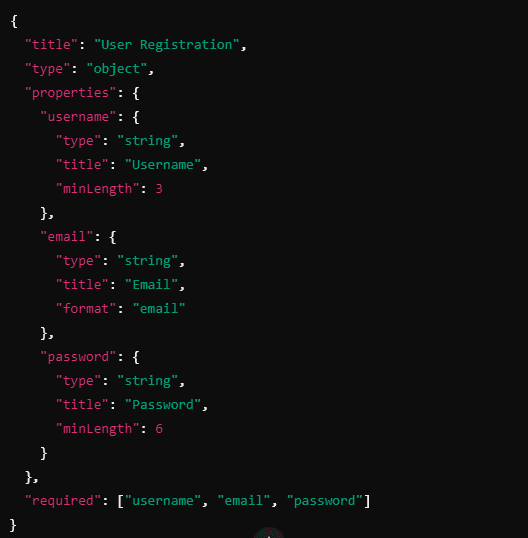
This schema defines a form with three fields: username, email, and password, each with specific validation rules.
Depending on your technology stack, you can choose a suitable library or framework to handle JSON Forms. For React applications, React JSON Schema Form is a popular choice. For Angular applications, angular2-json-schema-form is an excellent choice. These libraries provide components and utilities to make forms based on your JSON schema.
Integrate the chosen library or framework into your application and use it to make the forms based on your JSON schema. Ensure that the forms function correctly, including validation and data handling. Testing is crucial to verify that the forms behave as expected across different scenarios and user inputs.
"Explore Klamp Embed pricing to discover cost-effective automation solutions."
Once the basic integration is complete, you can customize the forms to match your application's design and user experience requirements. Many libraries allow you to customize form components and styles, giving you the flexibility to create forms that are not only functional but also visually appealing.
Use cases for JSON Forms
Dynamic Surveys and Feedback Forms
For SaaS applications that gather user feedback or conduct surveys, JSON Forms provide a flexible solution. You can create dynamic forms that adjust based on the survey's requirements or the user’s earlier responses, ensuring that the forms are relevant and engaging.
Complex Data Entry Forms
Applications that require complex data entry, such as financial software or CRM systems, can receive help from JSON Forms. By defining the form structure and validation rules in JSON, you can create intricate forms that are still easy to keep and update.
Configuration Interfaces
SaaS applications often need to give configuration options to users. JSON Forms can be used to create configuration interfaces that allow users to customize settings or preferences, with the form structure defined in JSON for easy updates and consistency.
JSON Forms are revolutionizing the way forms are handled in SaaS applications by offering flexibility, dynamic generation, and consistency. By using JSON schema to define form structures and validations, you can create adaptable and maintainable forms that improve the user experience and streamline data management. Whether you're developing a new application or looking to improve an existing one, integrating JSON Forms can provide significant benefits and drive efficiency in your development process.
"Explore Klamp Embed pricing to discover cost-effective automation solutions."
For more info on easy automation solutions visit Klamp Embed & Klamp Connectors