
What is Pagination in REST API?

Table of Contents
REST APIs, pagination becomes a key element in ensuring smooth data retrieval and efficient resource management. This blog post delves into what pagination in REST APIs is, why it’s essential, and how it can be effectively implemented to enhance performance and user experience.
Pagination in REST APIs
Pagination is a technique used to divide large datasets into smaller, manageable chunks or pages. This approach prevents overwhelming users with extensive amounts of data all at once and optimizes server performance by reducing the load during data retrieval. In the context of REST APIs, pagination involves breaking down the response data into pages and allowing clients to request specific pages as needed.
Why Pagination Matters:
- Handling large datasets in one go can strain server resources and slow down response times. Pagination mitigates this by fetching only a subset of data at a time.
- For applications with extensive data, such as search results or product listings, pagination helps users navigate through information more efficiently without having to scroll through a single, lengthy list.
- By transferring smaller amounts of data per request, pagination reduces the amount of bandwidth consumed, which can be crucial for mobile and low-bandwidth environments.
Common Pagination Techniques
Several pagination techniques can be employed in REST APIs, each with its advantages and use cases. Understanding these methods will help you choose the most appropriate approach for your API.
1. Offset-Based Pagination
Offset-based pagination is one of the most straightforward and widely used methods. It involves specifying an offset (the starting point) and a limit (the number of items to retrieve) in the API request. For example, if you want to retrieve items from the 21st to the 40th, you will set the offset to 20 and the limit to 20.
Example Request:

Pros:
- Simple to implement and understand.
- Allows easy navigation through pages.
Cons:
- It can lead to performance issues with large datasets, as the server must skip the offset before retrieving the desired data.
- Data inconsistencies can occur if the dataset is updated while paginating.
2. Cursor-Based Pagination
Cursor-based pagination, also known as keyset pagination, uses a cursor (a unique identifier or token) to keep track of the current position in the dataset. Instead of specifying an offset, clients provide a cursor that points to the last item retrieved, and the API returns the next set of results.
Example Request:

Pros:
- More efficient than offset-based pagination for large datasets, as it avoids the overhead of skipping records.
- Reduces the risk of data inconsistency since the cursor refers to the exact location.
Cons:
- Requires a unique identifier for each item, which might involve additional complexity in implementation.
- Clients need to handle cursors, which can be less intuitive than simple page numbers.
3. Page-Based Pagination
Page-based pagination involves dividing the dataset into a fixed number of pages. Clients specify the page number and the number of items per page to retrieve the desired data.
Example Request:

Pros:
- Easy to implement and understand.
- Suitable for scenarios where the total number of pages is known and manageable.
Cons:
- Less efficient than cursor-based pagination for large datasets due to the need to skip over items.
- Performance can degrade as the page number increases.
Implementing Pagination in REST APIs
To effectively implement pagination in your REST API, follow these best practices:
1. Define Pagination Parameters
Clearly define the pagination parameters in your API documentation. Common parameters include ‘limit’ (number of items per page),’ offset’ (starting point),’ page’ (page number), and cursor (unique identifier). Ensure that your API consistently uses these parameters across different endpoints.
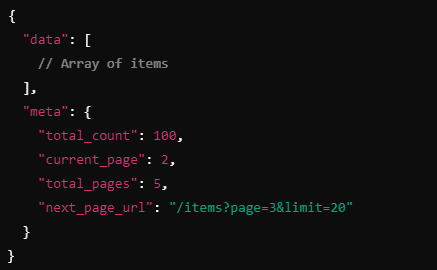
2. Include Pagination Metadata
Provide metadata in the API response to help clients understand the pagination state. This metadata typically includes:
- The total number of items available in the dataset.
3. Handle Edge Cases
Consider how your API will handle edge cases, such as:
- Empty Results: When there are no items to return, ensure the API gracefully handles this scenario.
- Out-of-Bounds Requests: If a client requests a page or cursor that doesn’t exist, return an appropriate error response.
- Data Changes: Address how data updates (e.g., additions or deletions) affect pagination, especially with offset-based methods.
4. Optimize Performance
For large datasets, optimize the performance of your pagination implementation by:
- Ensure that the database queries used for pagination are optimized with appropriate indexing to speed up data retrieval.
- Implement caching mechanisms to reduce database load and improve response times for frequently requested pages.
Pagination is a critical concept in REST API design that helps manage large datasets efficiently and enhances the user experience. By understanding the various pagination techniques offset-based, cursor-based, and page-based and implementing best practices, you can create APIs that deliver data in a performant and user-friendly manner.

"Check out Klamp Embed pricing for budget-friendly automation tools."
For more info on easy automation solutions visit Klamp Embed & Klamp Connectors