
What is cloud integration?
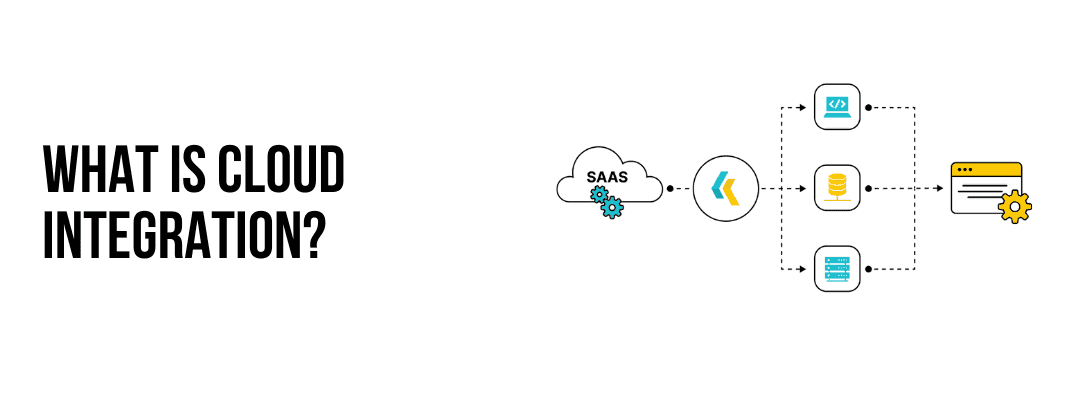
Table of Contents
What Is Cloud Integration?
Cloud integration is the process of connecting different cloud-based systems, applications, and services to work seamlessly together as a unified system. It involves synchronizing data, processes, and applications across multiple cloud environments, on-premises systems, or a hybrid of both, enabling businesses to streamline operations, improve efficiency, and enhance collaboration.
Businesses increasingly rely on cloud solutions for various functions such as customer relationship management (CRM), enterprise resource planning (ERP), marketing automation, and more. Cloud integration ensures that these disparate tools can communicate and share data effectively.
Why Use Cloud Integration?
Cloud integration plays a vital role in helping businesses streamline operations and remain competitive in a digital-first world. By connecting multiple cloud applications, on-premises systems, and data sources, it eliminates the inefficiencies caused by disjointed systems. Integration enables automated data exchange, reducing manual tasks and errors while ensuring consistent workflows across platforms.
For example, syncing an e-commerce platform with inventory and order management systems allows businesses to automatically update stock levels and process orders in real-time. Additionally, cloud integration improves collaboration by providing unified data access to teams, enabling them to make informed decisions.
It also enhances customer experiences by ensuring seamless interactions across different touchpoints, such as sales, marketing, and support. Ultimately, cloud integration provides the scalability and flexibility required to adapt to evolving business needs and technological advancements.
The Benefits of Cloud Integration Solutions
Streamlined Operations:
- Connects disparate systems, eliminating data silos.
- Automates workflows, reducing manual tasks and errors.
- Saves time and improves efficiency across operations.
Collaboration:
- Provides unified data access across teams and departments.
- Aligns tools like CRM and marketing platforms for better teamwork.
- Facilitates smooth data sharing and communication.
Insights:
- Synchronizes data in real time, ensuring up-to-date information.
- Empowers decision-makers with actionable insights.
- Enables quick responses to changing market conditions.
Improved Customer Experience:
- Ensures seamless interactions across customer touchpoints.
- Provides consistent customer data to support, sales, and service teams.
- Enhances personalization and efficiency in customer service.
Growth:
- Adapts to growing business needs and supports new tools.
- Allows adding or updating applications without disruptions.
- Offers flexibility for hybrid or multi-cloud environments.
Cost Efficiency:
- Reduces manual intervention and operational costs.
- Minimizes reliance on expensive on-premises infrastructure.
- Optimizes resources through automation and cloud services.
Better Data Governance and Security:
- Ensures secure data transmission with modern encryption techniques.
- Provides compliance features to adhere to regulations like GDPR or HIPAA.
- Improves data integrity and reliability across platforms.
Future-Ready Architecture:
- Supports integration with advanced technologies like AI, IoT, and machine learning.
- Simplifies adoption of new tools and platforms.
- Builds a robust foundation for innovation and growth.
By using these benefits, cloud integration solutions enable businesses to thrive in a competitive, fast-paced digital landscape.
Components of Cloud Integration
Data Integration: Ensures data consistency and accessibility across multiple platforms by synchronizing and consolidating information in real time or at scheduled intervals.
Application Integration: Links separate cloud applications so they can share functionalities and data, enabling a smooth workflow across platforms.
Process Integration: Automates workflows and ensures end-to-end process alignment across different systems.
Hybrid Integration: Connects cloud-based systems with on-premises applications to create a seamless ecosystem.
Types of Cloud Integration
- Point-to-Point Integration
- Hub-and-Spoke Integration
- API-Led Integration
- iPaas
Point-to-Point Integration: Establishes a direct connection between two systems or applications. While simple, it becomes difficult to manage as the number of integrations grows.
Hub-and-Spoke Integration: Uses a centralized hub to manage and monitor data flow, providing scalability and better management.
API-Led Integration: Employs application programming interfaces (APIs) to facilitate communication between applications, offering flexibility and reusability.
iPaas: A cloud-based platform that provides tools to connect applications and systems, enabling rapid integration with minimal coding.
Challenges of Cloud Integration
Data Security and Privacy: Ensuring secure data transmission and compliance with regulations like GDPR or HIPAA can be complex.
Integration Complexity: Connecting systems with different architectures, protocols, and data formats requires expertise and robust tools.
Latency Issues: Real-time integration may experience delays due to network or infrastructure limitations.
Data: Legacy systems or poorly integrated solutions can lead to isolated data repositories, hindering collaboration.
Cloud Integration Use Cases
CRM and Marketing Automation: Integrating tools like Salesforce with marketing platforms ensures customer data flows seamlessly, enabling personalized marketing.
E-Commerce and Inventory Management: Syncing e-commerce platforms with inventory systems ensures real-time stock updates and order tracking.
Finance and ERP Systems: Connecting financial tools with ERP systems streamlines accounting, payroll, and budgeting processes.
HR and Collaboration Tools: Linking HR management systems with collaboration platforms improves employee onboarding and communication.
Cloud Integration Tools
iPaaS Solutions: Platforms like Klamp, MuleSoft, and Dell Boomi provide pre-built connectors and automation features for seamless integration.
APIs: APIs from SaaS providers like Google Workspace, Slack, or Shopify enable direct communication and data sharing.
Middleware: Acts as a bridge between applications, translating and routing data between different systems.
The Trends of Cloud Integration
With the increasing adoption of multi-cloud strategies and hybrid environments, cloud integration is evolving to meet new demands. Emerging trends include:
AI-Driven Integration: Using AI to optimize workflows and enhance integration capabilities.
Serverless Integration: Using serverless architectures to reduce costs and improve scalability.
Edge Computing: Combining cloud integration with edge computing to handle data processing closer to its source for faster responses.
Cloud integration is a vital component of modern digital transformation, enabling businesses to stay agile, competitive, and connected in an increasingly cloud-centric world. Whether you're a growing startup or an established enterprise, implementing a robust cloud integration strategy is key to unlocking your organization's full potential.
Recommend reading
Streamlining ClientJoy Workflows with Klamp
How Klamp Empowers Seamless ProspectX Integrations for Sales
For more info on easy automation solutions visit Klamp Embed & Klamp Connectors