
Discord Guide to Using Relative Timestamps Easily
Table of Contents
Discord Relative Timestamp
Discord timestamp is a feature that displays time in a relative format, such as "5 minutes ago" or "in 2 hours," making it easier to understand time differences at once. This feature is particularly useful in international communities where members are spread across different time zones. By using relative timestamps, you can ensure that everyone has a clear understanding of when events or messages occurred, without needing to convert time zones manually.

Why use Discord Relative Timestamps?
Using Discord timestamps improves communication by providing a consistent and easy-to-read time format. Whether you're scheduling events, tracking message history, or coordinating activities, timestamps help keep everyone on the same page. They clear confusion and ensure that time-related information is accurately conveyed to all members, regardless of their location.
How to generate a Discord Relative Timestamp
Using the Discord Timestamp Generator
A Discord timestamp generator is an online tool that helps you create timestamps in the correct format. These generators typically require you to input a date and time, and they provide the proper timestamp code to use in Discord. Here's how to use one:
Find a Discord Timestamp generator: Search for a reliable generator online.
Input the date and time: Enter the specific date and time you want to convert.
Generate the Timestamp: Click the generate button to create the timestamp code.
Copy the code: Copy the generated code to your clipboard.
Use in discord: Paste the code into your Discord message or channel.

Manually creating a Discord Relative Timestamp
If you prefer to create a timestamp manually, you can use a simple syntax provided by Discord. The basic format for a timestamp in Discord is:

Here’s a step-by-step guide:
Convert date to Unix Timestamp:
Use a timestamp converter tool to get the Unix timestamp (seconds since January 1, 1970) for your desired date and time.
Format the Timestamp :
Wrap the Unix timestamp in the ‘
Optional formatting:
Add a formatting code to customize the display. For example, ‘
Example
To display "1st August 2024, at 10:00 AM":
- Convert the date to a Unix timestamp: ‘1722495600’.
- Format it: ‘<t:1722495600:F>’.
Practical applications of Discord Relative Timestamps
Scheduling events
Using Discord timestamps to schedule events ensures that all members see the correct time in their local format. For example, if you're hosting a game night or meeting, you can provide a timestamp that automatically adjusts to each user's time zone.
Tracking message history
Timestamps are also useful for tracking the history of messages, particularly in busy channels. By using timestamps, you can quickly see when a message is sent, helping to manage conversations and keep track of essential information.
Coordinating activities
For communities that often coordinate activities, such as raids in gaming or collaborative projects, timestamps provide a clear and concise way to schedule and manage these events. They cut the need for constant time zone conversions and ensure everyone is on the same page.
Discord Relative Timestamp converter
Using a Discord Timestamp converter
A Discord timestamp converter is a tool that helps convert regular dates and time into the Unix timestamp needed for Discord. Here’s how to use it:
Find a converter tool: Look for a reliable Discord timestamp converter online.
Enter date and time: Input the wanted date and time into the converter.
Get the Unix Timestamp: The converter will provide the Unix timestamp.
Format for Discord: Use the Unix timestamp in the ‘
Example
To convert "25th December 2024, at 12:00 PM" to a Discord timestamp:
- Enter the date and time into the converter.
- Get the Unix timestamp: ‘1735152000’.
- Format it for Discord: ‘<t:1735152000:F>’.
Table: Differences Between Manual and Automated Timestamp Creation
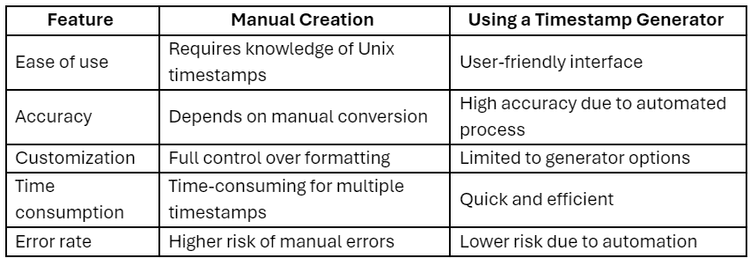
Knowing how to use Discord's relative timestamps can greatly improve your communication and coordination within the platform. Whether you're scheduling events, tracking message history, or coordinating activities, timestamps provide a clear and efficient way to manage time-related information. By using tools like Discord timestamp generators and converters, you can easily create and implement these timestamps, ensuring that your community is still synchronized and informed.
Integrate Discord app with others apps to automate your workflow using Klamp.io
For more info on easy automation solutions visit Klamp Embed & Klamp Connectors