
ChatGPT for Beginners
Table of Contents
Artificial intelligence has revolutionized how we interact with technology, and ChatGPT stands out as one of the most advanced conversational AI models available today. This guide will walk you through the basics of ChatGPT, how to get started with it, and how to integrate the ChatGPT API into your applications. Whether you're a beginner or someone looking to deepen your understanding, this comprehensive guide is for you.
What is ChatGPT?
ChatGPT, developed by OpenAI, is an advanced language model that uses deep learning to generate human-like text. It can engage in conversations, answer questions, provide recommendations, and even assist in creative writing tasks. Built on the GPT (Generative Pre-trained Transformer) architecture, ChatGPT has been trained on a diverse range of internet text, enabling it to understand and generate a wide array of human languages and contexts.
Why Use ChatGPT?
ChatGPT offers several benefits:
- Versatility: ChatGPT can handle a variety of tasks, from answering simple questions to providing detailed explanations and generating creative content.
- Accessibility: With the availability of the ChatGPT API, integrating advanced conversational capabilities into your applications has never been easier.
- Efficiency: Automate customer support, content creation, and other repetitive tasks, saving time and resources.
ChatGPT Basics
Before diving into the technical aspects, it's essential to understand the basics of ChatGPT:
- Language Model: ChatGPT is a language model trained to predict the next word in a sentence based on the previous words. This allows it to generate coherent and contextually relevant responses.
- Training Data: The model has been trained on a mixture of licensed data, data created by human trainers, and publicly available data to ensure it understands a wide range of topics.
- Applications: ChatGPT can be used for various applications, including chatbots, virtual assistants, content generation, tutoring, and more.
Setting Up ChatGPT
To start using ChatGPT, follow these steps:
- Sign Up for OpenAI: Create an account on the OpenAI website to access ChatGPT and its API.
- API Key: Obtain your API key from the OpenAI dashboard. This key is essential for making API requests.
- Environment Setup: Ensure you have a suitable development environment. You can use languages like Python to interact with the ChatGPT API.
ChatGPT API Integration
The ChatGPT API
The ChatGPT API allows developers to integrate the capabilities of ChatGPT into their applications seamlessly. This integration can enhance user experiences by providing interactive and intelligent conversational abilities.
Steps for ChatGPT Integration
1. Install Dependencies: Install the necessary libraries for making API requests. For Python, you can use libraries like requests or openai.2. API Authentication: Use your API key to authenticate your requests. Here’s a simple example in Python:

2. API Authentication: Use your API key to authenticate your requests. Here’s a simple example in Python

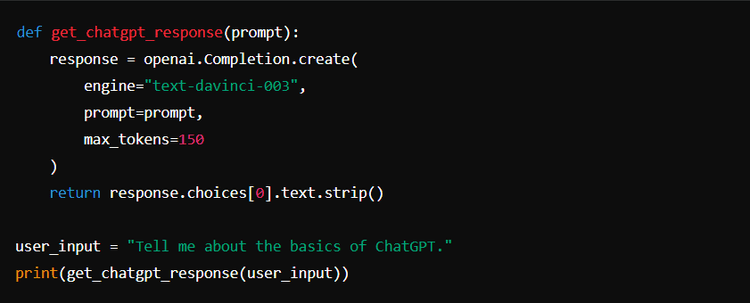
3. Making Requests: Send requests to the ChatGPT API to generate responses. Here’s an example function to get a response from ChatGPT:
4. Handling Responses: Process the responses from ChatGPT to suit your application’s needs. This might involve formatting the text, handling errors, and integrating it into your user interface.
Advanced ChatGPT Integration
Customizing Responses
You can customize the behavior of ChatGPT by adjusting parameters like temperature and max_tokens :
- Temperature: Controls the randomness of the output. Lower values make the output more focused and deterministic, while higher values increase randomness
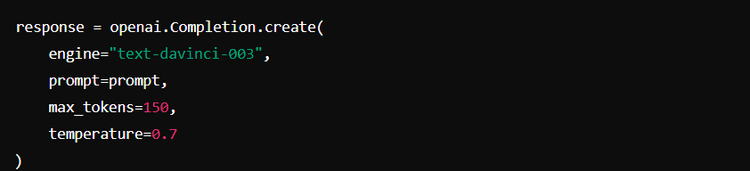
- Max Tokens: Limits the length of the generated response.
Building a Chat Interface
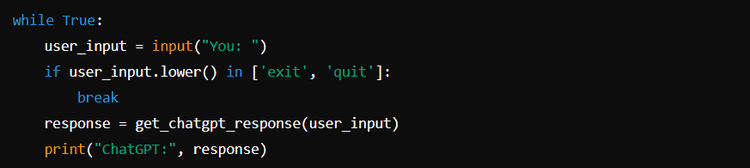
For a more interactive experience, you can build a chat interface that continuously interacts with ChatGPT. Here’s a simple example:
ChatGPT for Beginners: Practical Use Cases
Customer Support
Automate customer support by integrating ChatGPT into your support channels. This can help in providing instant responses to common queries, reducing the workload on human agents.
Content Creation
Leverage ChatGPT to generate blog posts, social media updates, and other content types. It can help in brainstorming ideas, drafting content, and even editing for style and grammar.
Education and Tutoring
Use ChatGPT as a virtual tutor to assist students with their queries. It can provide explanations, answer questions, and guide learners through complex topics.
For seamless integration of ChatGPT into your business processes, consider using Klamp. Klamp offers a straightforward way to integrate ChatGPT and other AI tools into your existing systems, ensuring smooth automation and enhanced functionality. Integrate ChatGPT with any apps using Klamp.io
For more info on easy automation solutions visit Klamp Embed & Klamp Connectors